Still Running 5 Year Old Computers?

Still Running 5-Year-Old Computers? Here’s What It’s Actually Costing Your Firm
Most firm owners don’t think much about hardware until something breaks. A machine dies, IT gets called, someone drives to Best Buy or places an order, and two days of lost time later, everything is back to normal. Crisis managed.
The problem is that’s not actually what hardware failure looks like in practice. It rarely happens all at once. What actually happens is slower and quieter — and that’s exactly what makes it expensive.
For architecture, engineering, construction, and manufacturing firms — where your team spends its day inside large CAD models, BIM files, and design applications — aging computers don’t just slow you down when they die. They drain you every single day while they’re still running.
The “Good Enough” Trap
It’s easy to look at a four-year-old workstation that still boots up and still runs the software and conclude that replacing it would be wasteful. That logic makes sense on the surface. It doesn’t hold up when you look at what the machine is actually costing you.
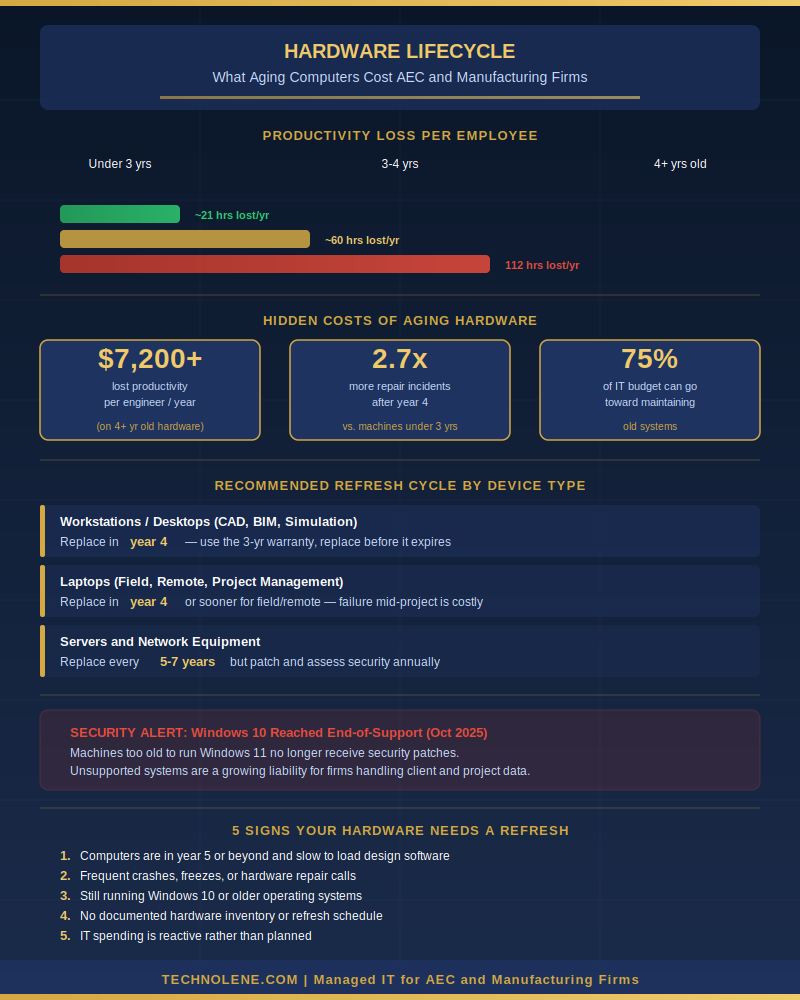
The data is pretty blunt about it: employees working on computers four years old or older lose an average of 112 hours of productive time per year — roughly 14 full workdays — compared to colleagues on newer machines [1]. That’s not downtime from a failure. That’s minutes per day, every day, bleeding away through slow load times, sluggish rendering, and files that take longer to open than they should.
At a typical burdened labor rate for a design professional, using the Bureau of Labor Statistic May 2024 data, the medium salary for a civil engineer was $99,950 those 112 hours work out to $7,200 or more per employee per year [2]. In a ten-person firm where most of the machines are pushing four or five years old, you’re absorbing something in the neighborhood of $72,000 annually in lost productivity — and there’s no invoice for it anywhere. It just disappears.
Slow hardware feels like a minor inconvenience. The math says otherwise.
What Happens After Year Three
Think of a business computer the same way you’d think about a company vehicle. For the first few years, it’s reliable, low-maintenance, and does the job without much drama. After year three or four, that changes.
After the four-year mark, repair frequency for business computers climbs 2.7 times higher than for newer machines [2]. Security vulnerabilities stack up because older hardware often can’t run current operating systems or receive the patches that protect against new threats.
That second point matters more than it used to. Windows 10 reached end-of-support in October 2025, which means any machine that can’t run Windows 11 is no longer receiving security updates [3]. For a firm that handles client project files, financial records, and sensitive design data, running unsupported software isn’t a technical footnote — it’s a liability.
Here’s the cost that never makes it onto a single line item anywhere: the ongoing IT time and money spent keeping old machines alive.
Firms running aging hardware can end up spending as much as 75% of their IT budgets just maintaining old equipment [4] — money that’s going toward nothing productive, nothing new, and nothing that moves the business forward. It’s pure overhead chasing a depreciating asset.
Compare that to what happens when you take a proactive approach. The data backs this up — Intel’s research found that PCs replaced on a 3-to-3.5-year cycle have the lowest total cost of ownership over time [5]. For most businesses, that translates to a practical rule: ride out your 3-year warranty, then schedule replacement in that first year out of coverage — before repair frequency climbs and before you’re carrying a machine with no safety net. The upfront cost is almost always less than what the alternative quietly accumulates.
The most expensive computer in your office is probably the one that’s “still working.”
The Right Approach for AEC and Manufacturing Firms
A hardware lifecycle plan doesn’t mean replacing every machine on a fixed calendar whether it needs it or not. It means having a clear picture of what you own, how old it is, what it’s running, and what the real cost of keeping it actually is.
A few practical guidelines for firms in this space:
- Workstations and desktops: Replace in year 4 — use the full 3-year warranty, then schedule replacement before that first year out of coverage ends. For heavy CAD, BIM, or rendering roles, the case for year 3 replacement is strong.
- Laptops: Same rule applies — replace in year 4, or sooner for field and remote staff where a failure mid-project isn’t just inconvenient.
- Servers and network equipment: 5 to 7 years, but assess annually and stay current on patches.
The pattern you want to avoid is the one most small and mid-sized firms are running right now: keep machines until they fail, then scramble. That approach feels conservative until you add up what it actually costs — and by then, you’ve usually already paid it.
What to Expect When You Get This Right
Firms that have gotten this right don’t treat hardware replacement as a crisis response. They treat it the way a well-run operation treats any other capital asset: with a schedule, a budget line, and someone watching it.
Machines are spec’d for the software your team actually runs, not for a generic office workstation budget. Refresh cycles are planned out far enough in advance that replacements aren’t a surprise. And when a machine does reach the end of its useful life, it’s off the network before it becomes a security problem — not after.
The firms I’ve seen do this well also tend to have fewer of the other symptoms: lower IT support overhead, fewer days where someone is waiting on a repair, and a lot less of the quiet frustration that comes from people spending their day fighting their tools.
The Math Only Works One Way
If your machines are into year five or beyond, the question isn’t whether they’re still turning on. It’s whether the cost of keeping them is less than what you’re losing — in productivity, in security exposure, in IT overhead, and in the engineers and designers who quietly decide that the friction isn’t worth it.
Technolene works with architecture, engineering, construction, and manufacturing firms across the Inland Empire and Coachella Valley to build realistic hardware lifecycle plans — no unnecessary upgrades, no scramble when something finally dies. Reach out to talk through what makes sense for your team.
→ Schedule a complimentary assessment at technolene.com