
Most firms don’t think about disaster recovery until they need it. And by then, it’s too late to plan.
Here’s a scenario that plays out more often than it should: a small engineering firm loses a server to a power surge during a storm, fire, or just utilities being utilities. The UPS fails (story for another day) and the server—which hosted six months of active project files—is gone. Backups, sure they exist, sort of. The last successful backup was twelve days ago, and nobody has verified whether it would actually restore. Recovery ends up taking eleven days and costing the firm three clients.
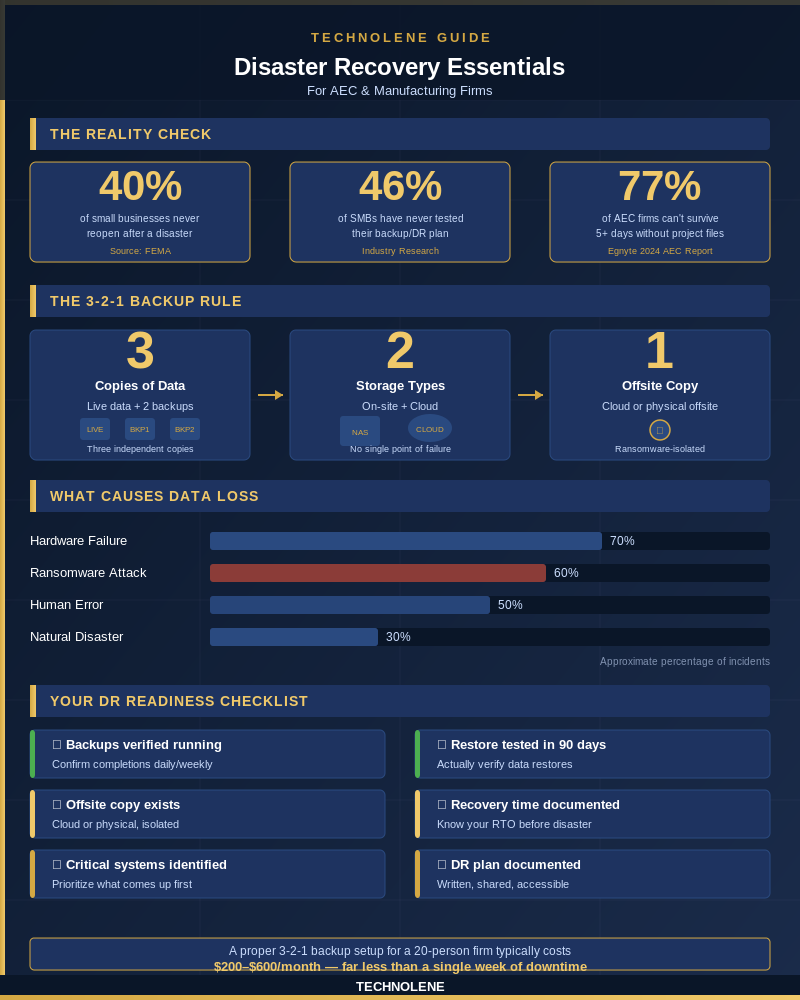
That story isn’t unusual. FEMA estimates that 40 percent of small businesses never reopen after a natural disaster—and an additional 25 percent close within the following year. For firms that run on project files, CAD drawings, and spec sheets, a prolonged outage isn’t just an IT problem. It’s an existential one.
Your Backup Isn’t a Recovery Plan
There’s a distinction most small firms miss: having a backup and having a recovery plan are not the same thing.
A backup is a copy of your data. A recovery plan answers the harder questions: How fast can we get back online? Which systems come up first? Who’s responsible for what? Have we actually tested this?
Research on SMB preparedness consistently finds that 46 percent of small businesses have never tested their backup and disaster recovery plan. That’s nearly half of all businesses running a system they’ve never verified actually works. In construction or engineering, this is like spec’ing a structural system you’ve never load-tested.
The other gap is coverage. Many firms back up their file servers but overlook the software licenses, configuration files, and network settings that IT systems need to function. Restoring files to a system that isn’t properly configured can take just as long as starting from scratch.
What Actually Causes Data Loss
People tend to imagine data loss as a dramatic event—a flood, a fire, a lightning strike. Those things happen. But the more common causes are quieter.
Hardware failure. Hard drives have a finite life. Without proactive replacement cycles, drives fail without warning—often taking data with them.
Ransomware. AEC and manufacturing firms are prime ransomware targets. A 2024 industry report found that 77 percent of AEC firms said they couldn’t tolerate more than five days without access to project documents—yet ransomware attacks regularly lock firms out for three weeks or more.
Human error. Files get accidentally overwritten or deleted. Folders get moved. Without versioned backups, there’s no way to roll back.
Software corruption. An update goes wrong. A database gets corrupted. The application fails on restart.
None of these require a natural disaster. All of them require a recovery plan.
The 3-2-1 Rule, Explained Simply
If you’ve talked to any IT professional about backups, you’ve probably heard “3-2-1.” It’s the standard framework, and it’s straightforward.
3 copies of your data. Your live data counts as one. The other two are backups.
2 different storage types. For example, an on-site NAS drive and a cloud backup. This protects against a single device failing.
1 copy stored offsite. If your office burns down—or gets hit by ransomware—an offsite copy (cloud or physical) is what saves you.
The point isn’t redundancy for its own sake. It’s that any single point of failure has a backup. For a 20-person AEC firm, a proper 3-2-1 setup typically runs $200–$600 per month, depending on data volume. That’s not a large number relative to what a two-week outage would cost in unbillable hours, recovery fees, and missed deadlines.
Key Takeaways at a Glance
Recovery Time Is the Number That Matters
The question isn’t just “do we have backups?” It’s “how long before we are back up?”
For a small firm with no tested plan, recovery from a significant failure can take one to four weeks. During that window, projects stall, staff can’t work, and client relationships get strained. The math is simple: if your team bills at $150 per hour loaded across fifteen people, every day offline costs roughly $13,500 (based on a 75% bill rate) in lost capacity—before you account for recovery expenses.
Having a backup is not the same as being able to recover quickly. The firms that have peace of mind knowing they can recover in hours, not weeks, are the ones that have tested their systems and know exactly what to do when things go wrong.

Where to Start
If you haven’t looked at your backup and recovery setup recently, the first step is understanding what you actually have. That means confirming your backups are running and completing successfully, verifying that at least one restore has been tested within the past 90 days, identifying your recovery time objective—how long can you actually afford to be down—and ensuring at least one backup copy is offsite or in the cloud, isolated from your primary systems.
None of this requires a large investment upfront. It requires knowing where you stand.
If you’d like a second set of eyes on your current backup setup, Technolene offers a straightforward IT assessment for AEC and manufacturing firms. No pressure, no pitch—just a clear picture of where your risks are. Reach out at technolene.com.
Sources
- https://advocacy.sba.gov/wp-content/uploads/2024/10/Small-Businesses-and-Natural-Disasters_FINAL.pdf
- https://phoenixnap.com/blog/disaster-recovery-statistics
- https://www.egnyte.com/press-releases/enhanced-data-resilience-will-help-aec-industry-handle-risks-impact-their-businesses
- https://technolene.com