
Most architecture and engineering firms don’t lose money to dramatic IT failures. They lose it to small, repeated delays that nobody bothers to add up. The four extra seconds it takes Revit to swap views. The minute waiting for a 200 MB DWG to pull from the file server. The fifteen minutes after every restart when Outlook, the VPN, and the license server all wake up in the wrong order. None of it feels like a problem. All of it shows up on the P&L.
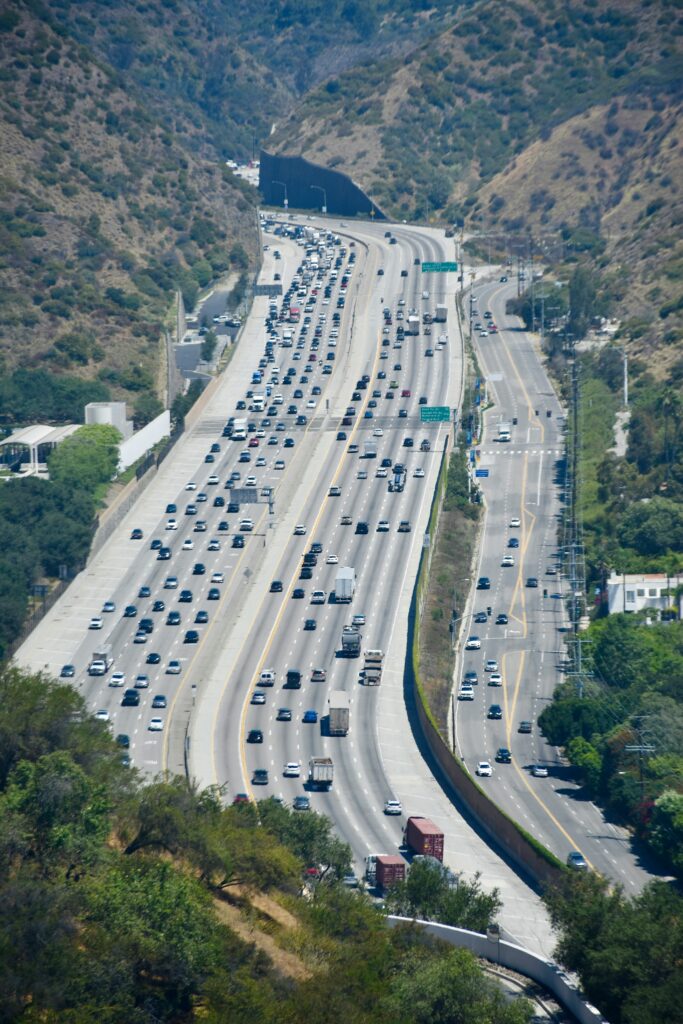
Slow infrastructure feels just like traffic — every individual delay is small, but the day still disappears.
In an industry where revenue is built on billable hour
Most architecture and engineering firms don’t lose money to dramatic IT failures. They lose it to small, repeated delays that nobody bothers to add up. The four extra seconds it takes Revit to swap views. The minute waiting for a 200 MB DWG to pull from the file server. The fifteen minutes after every restart when Outlook, the VPN, and the license server all wake up in the wrong order. None of it feels like a problem. All of it shows up on the P&L.
Slow infrastructure feels just like traffic — every individual delay is small, but the day still disappears.
In an industry where revenue is built on billable hours, slow infrastructure isn’t an inconvenience — it’s a tax. And like any tax that nobody itemizes, it grows quietly until somebody finally does the math.
s, slow infrastructure isn’t an inconvenience — it’s a tax. And like any tax that nobody itemizes, it grows quietly until somebody finally does the math.
Why the AEC Industry Feels This More Than Most
Architecture and engineering work is uniquely sensitive to infrastructure performance. The tools — Revit, AutoCAD, Civil 3D, Bluebeam, Navisworks, structural analysis suites, rendering engines — are some of the heaviest applications a small business will ever run. The files are enormous. Revit central models routinely cross 150 MB. A coordinated multi-discipline project can push past a gigabyte before you’ve even linked in the consultants’ models.
Now layer in how a typical A&E team actually works: multiple people in the same model at the same time, syncing changes back to a central file, opening and closing dozens of linked references, rendering, plotting, and pushing deliverables to clients. Every one of those actions touches the network, the file server, the workstation, and — increasingly — the cloud. If any one link is sluggish, the entire chain bogs down.
That’s why a firm with the same number of employees as the accounting practice next door can have an infrastructure load five or ten times heavier. And it’s why the cost of getting it wrong is so much steeper.
Doing the Math Nobody Wants to Do
Let’s put rough numbers on it. Architect and engineer billing rates in 2025 generally fall between $100 and $300 per hour, with senior staff and principals on the higher end. Even using a conservative blended rate of $150 per hour and a standard overhead multiplier of around 2.8, every billable hour represents real revenue and real opportunity cost when it goes missing.
Now imagine each member of a ten-person team loses just 20 minutes a day to infrastructure friction — slow logins, lagging models, hung syncs, a flaky VPN that needs to be reconnected, files that take too long to open. Twenty minutes per person, per day, across a ten-person team, over a 240-working-day year:
- 10 people × 20 minutes = 200 minutes per day
- 200 minutes × 240 days = 48,000 minutes/year = 800 hours/year
- 800 hours × $150 blended billable rate = $120,000 per year
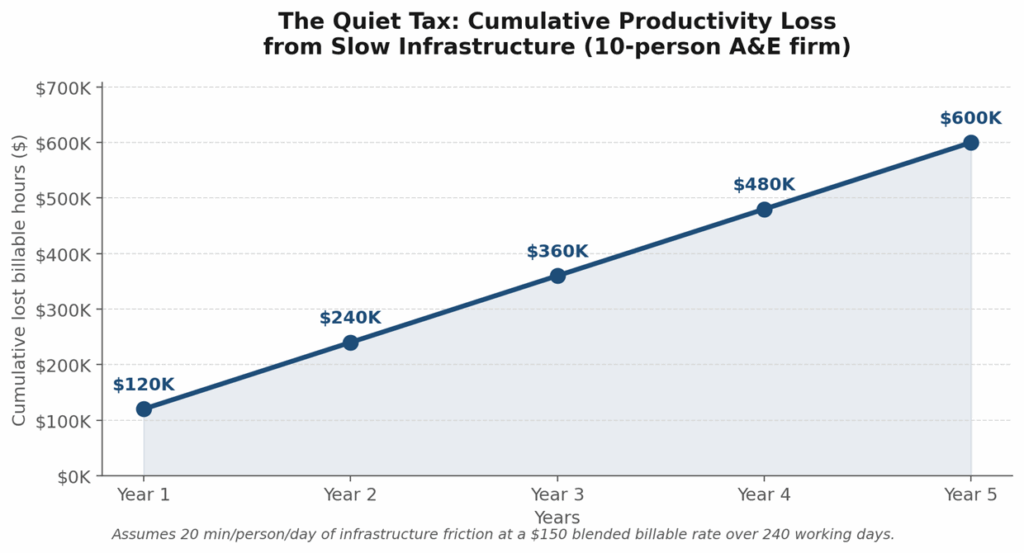
Even modest daily friction compounds into six figures fast — and keeps compounding.
That’s a six-figure annual line item that doesn’t exist on any invoice. Industry-wide, an Oxford Economics study pegged the average cost of downtime at roughly $9,000 per minute for organizations of all sizes — and even small slowdowns add up fast. One analysis of engineering firms calculated that a 12-person team losing just 20 minutes a week to IT issues was burning $15,000 to $20,000 a year in productivity. Multiply the frequency, and the number balloons.
And this is before you account for the projects that slip a week and trigger a deadline penalty, the proposal that doesn’t get finished on time, the model corruption that costs a Saturday of rework, or the senior engineer who finally decides the daily friction isn’t worth it anymore.
Where Slow Infrastructure Actually Hides
Most leaders assume that if the workstations aren’t obviously broken, the IT environment must be “fine.” In reality, the cost is almost always hidden in five places:
- Underpowered or aging workstations. Revit and AutoCAD lean heavily on single-threaded CPU performance, fast NVMe storage, and ample RAM. Industry guidance now puts 32 GB of memory as the minimum for comfortable work in small-to-medium models and 64 GB as the practical floor for anything over 500 MB or with multiple linked disciplines. A four-year-old laptop spec’d for general office work can’t keep up, and the user feels it every minute of the day.
- File servers and network plumbing. Revit, in particular, hammers the network. Every time someone opens a central model, the application copies the entire file across the wire. With a 1 Gbps LAN that’s annoying. On an aging switch or saturated Wi-Fi, it’s painful. Across a VPN to a home office, it can be a deal-breaker.
- Worksharing that wasn’t architected for the team’s size. File-based worksharing in Revit starts to strain at five or six concurrent users. Past that, sync times grow, conflicts increase, and the team waits in line for the central file. Many firms outgrow their original setup without ever realizing it — they just assume “Revit is slow today.”
- VPN and remote access. Hybrid work is now permanent. The IT setups that were thrown together in 2020 were never meant to run heavy CAD/BIM workloads over consumer internet. Slow logins, unstable tunnels, dropped sessions, and delayed file syncing are the most-cited remote-work complaints in engineering firms — and they directly burn billable hours.
- Backup and license servers nobody is watching. An unmonitored backup that silently fails is a disaster waiting to happen. A license server that hiccups in the middle of a sprint can stop ten people cold. These are exactly the systems that benefit most from proactive monitoring, and exactly the ones that small firms rarely have anyone formally watching.

The cost shows up in the team long before it shows up on a spreadsheet.
The Utilization Rate Problem
There’s another way to see the cost: utilization rate. In architecture and engineering, utilization — the percentage of an employee’s available time spent on billable client work — is one of the most-watched financial metrics in the business. Recent industry benchmarks put the average architecture firm’s utilization rate at around 81%, with top performers approaching 94%. The lowest-performing firms see more than 30% of staff time disappear into non-billable activity.
Some of that gap is unavoidable: business development, training, admin, PTO. But a meaningful portion is technical friction — time that should be billable, isn’t, and shows up on no timesheet line because no one is calling it out. Moving utilization up even two percentage points by removing infrastructure drag is, in financial terms, equivalent to adding revenue without adding headcount. For a ten-person firm with $2 million in annual labor cost, a 2-point utilization gain is roughly $40,000 of pure margin recovered. Every year. From doing nothing more than letting people work uninterrupted.
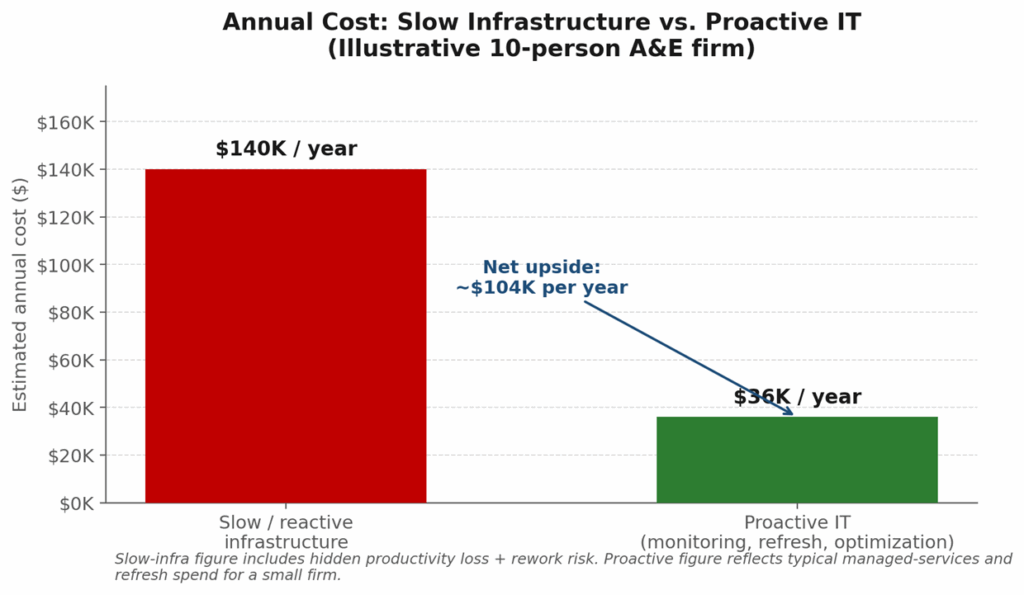
The math shifts dramatically once proactive IT is in the picture.
The Costs You Don’t See on a Spreadsheet
If the dollar figures were the end of it, leaders could write a check and move on. But slow infrastructure carries second-order costs that are harder to quantify and often more damaging:
- Recruiting and retention. The best designers and engineers have options. When their day is punctuated by lag, crashes, and forty-five-second view swaps, they don’t stay quiet about it — they leave. And replacing a mid-level architect or PE costs far more than upgrading the workstation that frustrated them.
- Errors and rework. Tired, frustrated people make more mistakes. A model that crashes mid-edit doesn’t just cost the time to restart — it sometimes costs the work that was in progress, and occasionally a flaw that makes it through QA because someone was working around the tool instead of focusing on the design.
- Client perception. Deliverables that arrive late, drawings that show up corrupted, plotting issues that delay a submittal — the client doesn’t care whether the cause was the renderer, the file server, or the printer. They just remember that your firm missed.
- Strategic ceiling. Most damagingly, a firm running on strained infrastructure cannot easily take on a larger or more complex project. The size of the model you can comfortably coordinate, the number of concurrent users you can support, the size of the team you can scale to — these are all gated by the IT foundation underneath.
What “Good” Looks Like
Firms that have gotten this right share a few characteristics. They treat IT as project infrastructure, not as office plumbing. Workstations are spec’d for the software, not for the budget line. The file server, switches, and Wi-Fi are sized for current workloads and refreshed on a schedule rather than after a failure. Worksharing topology — file-based vs. Revit Server vs. Collaboration for Revit / Autodesk Docs — is matched to the team size and the way the team actually works, not the way it worked five years ago.
Critically, somebody is watching. Backups are verified, not assumed. Drive health, license server status, network throughput, and VPN performance are monitored continuously, so the team finds out about problems before users do. Patching is on a calendar. And when something does go wrong, there’s a documented path to resolution that doesn’t involve the senior PM losing a half-day to phone tag with a vendor.
None of this requires a Fortune 500 budget. It requires a partner who understands both the IT side and the realities of how A&E firms actually run.
Where Most Firms Are Leaking Money Right Now
If you read the math above and felt a flicker of recognition, you’re not alone. Most of the firms we talk to are surprised by how much friction has crept into their day-to-day — not because they ignored their IT, but because nobody was specifically watching it on their behalf, and the team had quietly learned to work around it.
Technolene works with architecture, engineering, and construction firms across the Inland Empire and Coachella Valley to measure exactly that drag and design infrastructure that gets out of the team’s way. We offer a complimentary network and workflow assessment for local A&E firms. No jargon, no sales pressure — just a candid picture of where your infrastructure stands and what, if anything, is quietly costing you billable hours.
→ Schedule your complimentary assessment at technolene.com
Technolene Solutions | Redlands, CA | Serving the Inland Empire and Coachella Valley