

When a fire breaks out, a fire truck is exactly what you need. But nobody wants to be in that situation. That’s why we have smoke detectors — and that same principle applies to proactive IT monitoring for your business network. Catching a problem early, when it’s still just a wisp of smoke, is infinitely better than fighting a blaze.
Your business IT network works the same way.
The "Break-Fix" Trap Most Businesses Are Stuck In
If your current IT strategy is to call someone when something breaks, you’re running on a fire truck model. It feels fine — until the day your server goes down at 7 a.m., your team can’t access files, your customers can’t reach you, and you’re scrambling to find help while the clock ticks.
Industry data shows the average cost of unplanned IT downtime for a small business can exceed $400 per minute. For construction and AEC firms mid-project, add deadline risk, subcontractor delays, and client trust to that number.
The break-fix model isn’t just stressful. It’s expensive.

What Proactive Monitoring Actually Does
Proactive IT monitoring means your systems are being watched 24/7 — not by a person staring at a screen, but by intelligent tools that look for the early warning signs that precede most failures. Think of it as the smoke detector installed in every room of your business.

Here’s what proactive monitoring watches for:
• Disk health — Hard drives almost always show warning signs before they fail. Monitoring catches these signals before you lose data.
• Memory and CPU anomalies — Unusual spikes often signal malware, software issues, or hardware nearing end of life.
• Network irregularities — Unusual traffic patterns can indicate a security incident or equipment failure in progress.
• Backup failures — One of the most devastating surprises is discovering your backups weren’t running after you need them.
• Patch and update status — Unpatched systems are the #1 entry point for ransomware. Monitoring ensures nothing gets missed.
Reactive vs. Proactive — Side by Side
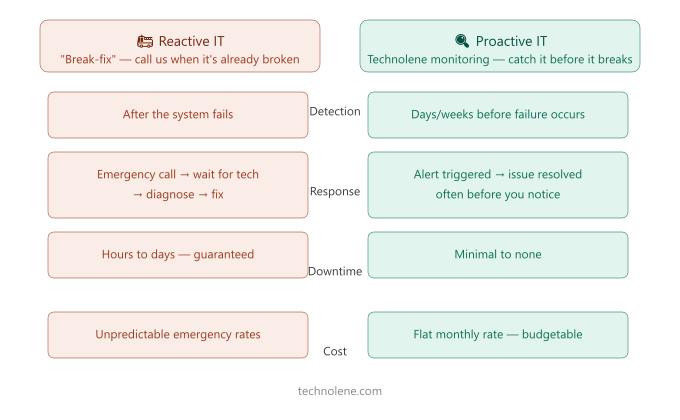
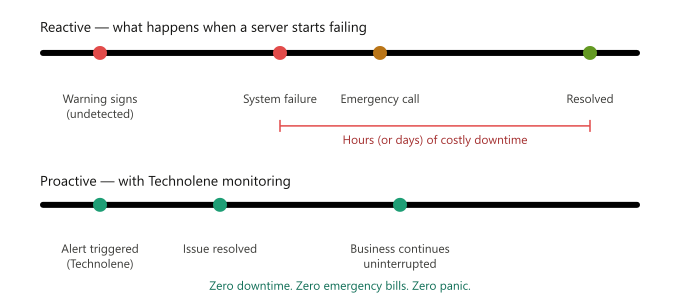
Here’s how these two approaches play out in the real world. In the reactive scenario, a failing drive goes unnoticed for weeks. One morning it crashes. Work stops. An emergency call goes out. Hours later a tech arrives, spends time diagnosing, and — if you’re lucky — data is recovered. The downtime alone costs more than a year of proactive monitoring would have.
In the proactive scenario, the monitoring platform flags early warning signs on that same drive. A ticket is quietly opened. The drive is replaced during business hours, at a scheduled time, before anything goes wrong. Your team never knew there was an issue.
That’s the smoke detector doing its job.
This Isn't Just for Big Companies
There’s a common misconception that proactive IT monitoring is something only large corporations can afford. That’s no longer true. At Technolene, we deliver proactive IT monitoring to Inland Empire businesses of all sizes — construction firms, professional services, retail, healthcare, and more — as part of our managed IT services.
You get the same tools a Fortune 500 IT department uses, without the Fortune 500 payroll.
Is Your Business Running With a Smoke Detector?
If you’re not sure what’s happening on your network right now — or if your current IT approach is mostly reactive — it’s worth having a conversation.
We offer a complimentary network health assessment for local businesses. No pressure, no jargon — just a clear picture of where you stand and what, if anything, needs attention.
Technolene Solutions | Redlands, CA | Serving the Inland Empire and Coachella Valley
What Happens During a Complimentary Network Assessment
When we say complimentary assessment, we mean a real one — not a sales pitch disguised as a checkup. Here’s what we actually look at:
We review your current hardware health — servers, workstations, networking equipment — and flag anything showing early warning signs. We check your backup status to confirm your data is actually being protected and that recovery would work if needed. We look at your patch and update status across all devices to identify any open vulnerabilities. We review your network traffic patterns for anything unusual. And we give you a plain-English summary of what we found with no obligation.
Most business owners walk away surprised — either relieved that things are in better shape than they thought, or grateful they found out about a problem before it became a crisis.