If Your Files Were Gone Tomorrow, Could You Recover by Friday?
Imagine arriving at the office on a Tuesday morning, opening your file server, and finding nothing. Every project model, every contract, every drawing — encrypted. A message on the screen demands a wire transfer. And the clock is already ticking on your next project deadline.
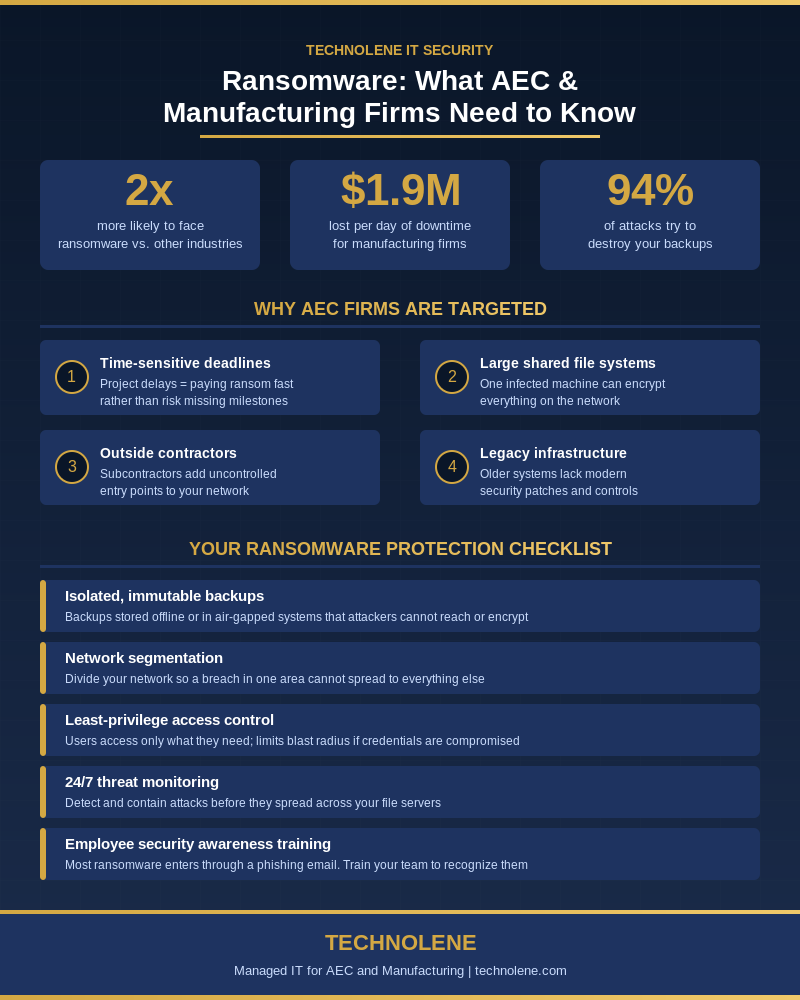
This isn’t a far-fetched scenario. Architecture, engineering, construction, and manufacturing firms are now more than twice as likely to be hit by ransomware than businesses in most other industries. [1] And when an attack hits, the average manufacturing firm loses over $1.9 million for every day their systems are down. [2]
The good news: this is not inevitable. The right protections — most of which don’t require ripping out your existing systems — can stop an attack before it costs you a project, a client, or your reputation.
Why Ransomware Loves AEC and Manufacturing
Think about what makes your business run: large shared file systems that dozens of people access all day, outside contractors and subcontractors who need file access to do their jobs, project timelines where even a two-day delay has real financial consequences, and infrastructure that in many cases hasn’t been meaningfully updated in years.
Cybercriminals know all of this. They target industries where the pressure to get back online quickly is highest — because that pressure makes firms more likely to simply pay the ransom rather than fight through a weeks-long recovery. Between August 2023 and July 2024, 481 construction organizations were listed on data-leak sites, a 34% increase from the prior year. [3]
If you are running Revit, AutoCAD, or any manufacturing execution software, your files are exactly what attackers are hunting for.
How Ransomware Actually Gets In
The Phishing Email
The overwhelming majority of ransomware attacks begin with one employee clicking one bad link in one email. It looks like a subcontractor submitting a bid, a vendor invoice, or a project update. By the time anyone notices something is wrong, the malware has already started moving through your network.
The Unpatched System
Legacy software — and construction and manufacturing firms run a lot of it — often contains security vulnerabilities that never get patched. Attackers actively scan for these weaknesses. An unpatched server is the equivalent of a door left unlocked.
The Contractor Laptop
You do not control what security software is on your subcontractors’ machines. When they connect to your file share or VPN, they bring whatever is on their device with them. One infected laptop is all it takes.
What Good Protection Actually Looks Like
1. Backups That Can't Be Encrypted
Here is the most important thing to understand about backups: ransomware specifically targets them. In 2024, 94% of ransomware attacks attempted to destroy or corrupt backup data, and in more than half of those cases, the attackers succeeded. [4]
Effective backups must be isolated from your live environment — stored in what’s called an air-gapped or immutable format, where even a compromised system cannot reach them. Think of it like having a spare key stored at your attorney’s office, not on the hook next to the front door.
2. Segment Your Network
If every computer on your network can freely communicate with every other computer, ransomware that gets onto one machine can spread to all of them within hours. Segmenting your network — essentially building internal walls — limits how far an attack can travel. A breach in the front office shouldn’t be able to reach the engineering file server.
3. Control Who Has Access to What
Not every person on your team needs access to every file. Limiting user permissions means that if an account gets compromised, the attacker can only access what that account was authorized to see. The smaller the blast radius, the faster and cheaper the recovery.
4. Monitor for Threats Before They Spread
Modern monitoring tools can detect ransomware behavior — unusual file encryption activity, abnormal login patterns, large data movements — and trigger an alert or automatic containment before the damage becomes catastrophic. Think of this as the difference between a smoke detector and a fire truck. One stops the fire before it starts; the other arrives after everything is already burning.
5. Train Your Team
Technology alone is not enough. Regular, practical security awareness training — not a one-time HR checkbox — teaches employees to recognize phishing emails and respond correctly. In an industry where project files are constantly shared with outside parties, this training is one of the highest-ROI investments a firm can make.
What Happens If You Don't Act
A ransomware attack costs more than the ransom demand. There is the downtime — typically 11 to 21 days — during which no one is productive. There is the cost of forensics and recovery. There is the reputational damage if client data or project IP is leaked. And there is the very real possibility that data which cannot be recovered simply has to be re-created from scratch, at your firm’s expense and time.
Prevention is not glamorous. But it is far, far less expensive than recovery — and in a project-driven business, it might be the difference between making deadline and losing a client.
Final Thoughts
Ransomware isn’t a someday problem for AEC and manufacturing firms — it’s a right-now problem. The firms that protect themselves are the ones that treat cybersecurity like they treat any other operational risk: something that gets assessed, planned for, and managed proactively.
If you’re not sure where your firm stands, that uncertainty is worth addressing. A straightforward security assessment can tell you exactly what you’re exposed to — and what it would take to fix it.